
Practice Operations Command Center
AdvanceAPractice Command Suite: Behavioral Health Operations Software
Your EHR, clearinghouse and credentialing files each hold one piece of the picture. Command Suite puts the stuck claims, the enrollments close to lapsing and today’s open tasks on one screen. Nobody has to stitch it together from three systems.
See It In Action
See Claims, Enrollments And Tasks Together
Your EHR, billing system, insurance portals and team chat each do their job. The money leaks out between them. It’s the denial nobody picked up, or the credentialing file nobody chased. Command Suite sits next to all of them and gives you one place to start the day.
What You Get
What You See Every Day.
- Claims, denials, and aging A/R in one shared workspace.
- Credentialing and payer enrollment status, with alerts before a lapse.
- Every task with a person’s name on it and a next step.
- A daily brief that shows which claims need work, which providers can’t bill yet and what’s still open.
- Team messaging tied to the work, not a separate inbox.
- A live weekly meeting room with agendas and carry-over.
- An operating roadmap that keeps the whole team aligned.
- A secure workspace for each practice, with focused operational and revenue work views.
Credentialing and payer enrollment status, with alerts before a lapse.
Every task with a person’s name on it and a next step.
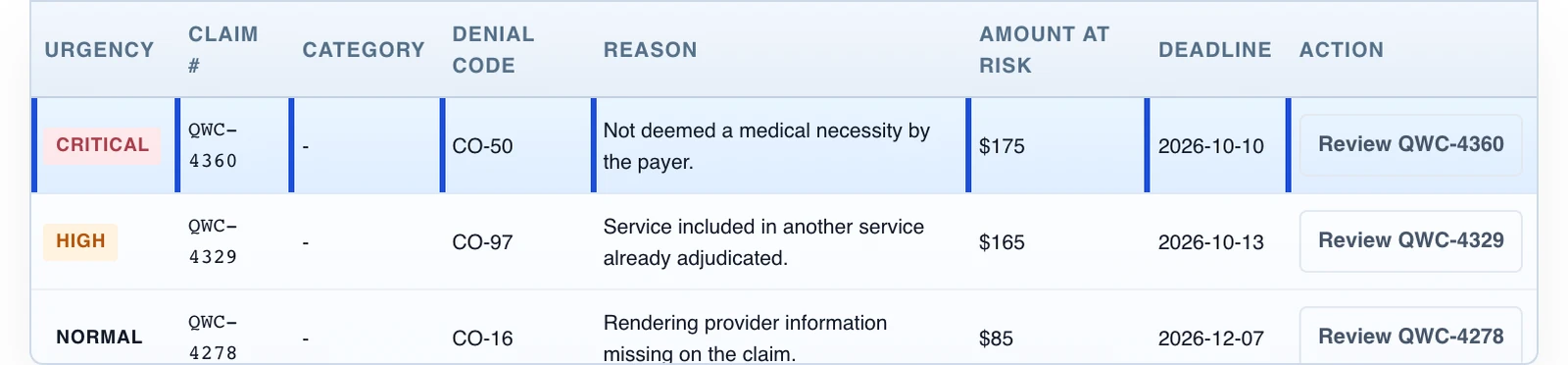
Claims, denials, and aging A/R in one shared workspace.
“They reorganized our workflows, improved how our team communicates, and brought in smart automation and AI-driven solutions that have saved us measurable time and money. The operational visibility alone has been a game-changer.”
The Core
Three Tools, One Shared Workspace.
Each one covers a different part of the work.
Revenue Cycle Command
Claims, denials and aging A/R in one view, so you can see where the money’s stuck.Credentialing Hub
Where each provider stands with each payer, so an enrollment doesn’t lapse without anyone noticing.Task & Project Ops
Every task and project with a person’s name on it and a next step.The AdvanceAPractice Command Suite is practice operations software, not an EHR, at $99 a month per practice for up to 10 users, month to month.
How It Works
From Setup To Daily Use
Practice Review
We find out where the gaps really are, whether that’s billing, credentialing, who’s handling which task, or all three.
Set Up Your Workspace
We set up the workspace around your team, using the information your existing systems already have.
Review What Needs Attention
Your team works from one daily view that surfaces what needs attention first.
Track Your Work In The Command Suite
The Command Suite gives the practice and the person at AdvanceAPractice who runs its work one secure place for project updates, messages, open tasks, owners, and next steps. It works alongside the EHR and clearinghouse and does not replace them.
Follow The Project
See completed work, the current status, decisions the practice needs to make, and the next steps without searching through email threads.
Keep Messages With The Work
Use the workspace to ask questions and keep decisions with the related task or project.
Use Only The Agreed Information
We confirm what information belongs in the workspace, who can see it, and what the practice's existing systems can safely provide.
Check Automation Before Relying On It
When automation is in scope, we test the import or connection, confirm the updated record, and make failures visible before relying on a schedule.
FAQ
Frequently Asked Questions
Does Command Suite Replace Our EHR Or Clearinghouse?
No. It sits alongside your systems. Documentation, scheduling and claims submission stay where your team already does them, and Command Suite adds the shared workspace they don’t have.
Will It Get Claims Paid Faster?
Not by itself. It shows your team which claims are stuck, so someone can follow up sooner. How fast a payer processes a claim or an approval is up to the payer, and we can’t promise that part.
Who Is It Built For?
Psychiatry and PMHNP practices and outpatient behavioral health groups. It’s for the administrators and operations leads who are tired of checking three systems to answer one question about a claim, a credentialing file or a task.
Rent It Instead
Want The Command Suite On Its Own? $99 A Month.
You get every module for your whole practice, for up to 10 people. There aren’t any per user fees. The BAA is included, and it’s month to month.
See Where Command Suite Fits.
Tell us which systems your team runs, and we’ll show you how Command Suite sits next to them. It’s $99 a month per practice, month to month.
More of the Suite: Executive Command Center, Reporting & Analytics, AI Assist, Trust & Security, and how the Command Suite works.